





A geolocation error stops your bet cold: you open TonyBet, go to place a wager, and the app insists you are not in Ontario. For players inside the province, this is almost always a fixable settings problem, not a banned account.
This guide covers how to fix geolocation error messages on TonyBet, why the checks run, and what changes when you cross a provincial line.
Why Geolocation Matters for Online Betting in Canada
Location is the gatekeeper for legal online betting in Canada, and the rules are set province by province.
Ontario’s Regulatory Requirements
TonyBet’s Ontario site is licensed for players physically located in Ontario and operates inside the province’s regulated market, which launched through iGaming Ontario on April 4, 2022. The AGCO requires every operator to confirm your location before a game loads and to block any session it cannot verify. That compliance rule is why casino geolocation and sportsbook geolocation checks fire every time you log in.
How Location Verification Technology Works
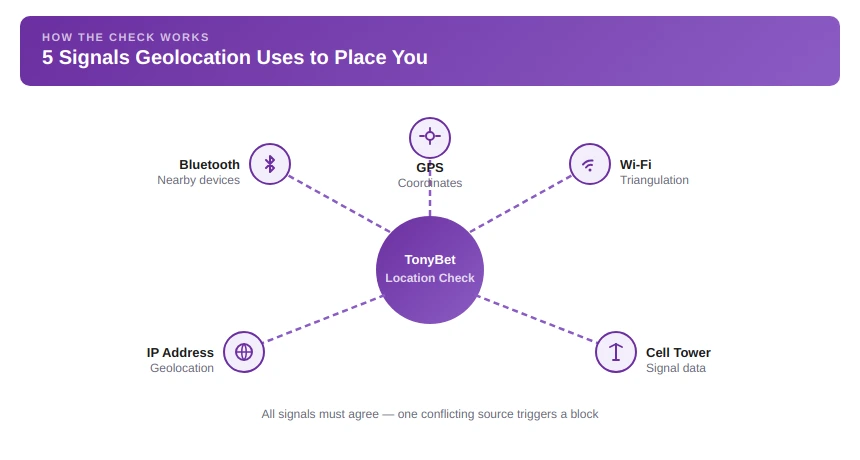
Geolocation’s meaning, in plain terms, is pinning your device to a real-world spot. TonyBet, like other Ontario operators, leans on a third-party geolocation provider that blends several signals: GPS latitude and longitude coordinates, Wi-Fi triangulation, cell tower data, Bluetooth, and IP geolocation.
Compliance vendors run hundreds of checks per transaction, pinging your device for fresh telemetry and matching your IP address against geolocation tools and VPN ranges. When the signals agree, you clear the radar in a second.
Common Geolocation Errors Explained
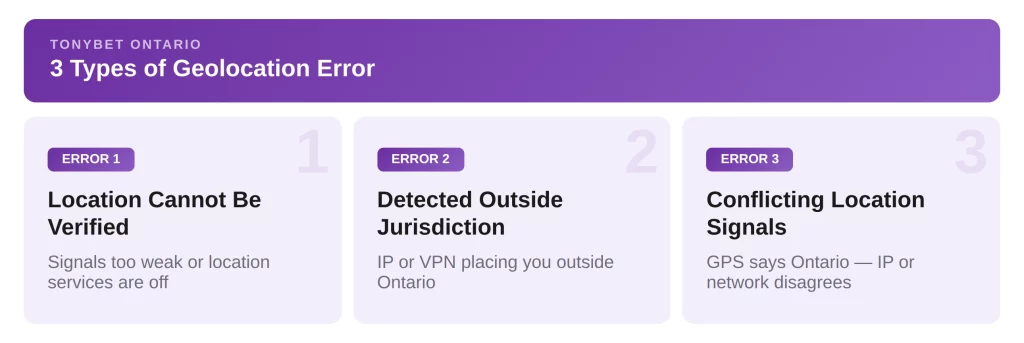
The wording varies, but TonyBet’s location failures fall into three buckets.
Location Cannot Be Verified
The most common message tells you your location cannot be confirmed. The text reads something like “an error has occurred due to your geolocation,” which means the system cannot read enough accurate signals after location services switch off or Wi-Fi drops.
Detected Outside Approved Jurisdiction
This error means your signals placed you beyond Ontario’s perimeter. If you are genuinely in the province, the common culprits are an IP address routed through another region, a live VPN, or a cell tower across a provincial border doing the talking.
Conflicting Location Signals
Sometimes your GPS says Ontario while your IP or network says elsewhere. The check treats that mismatch as a red flag and blocks the wager rather than guessing, which is how a single stray signal triggers a geolocation error.
The Most Common Causes of Geolocation Problems
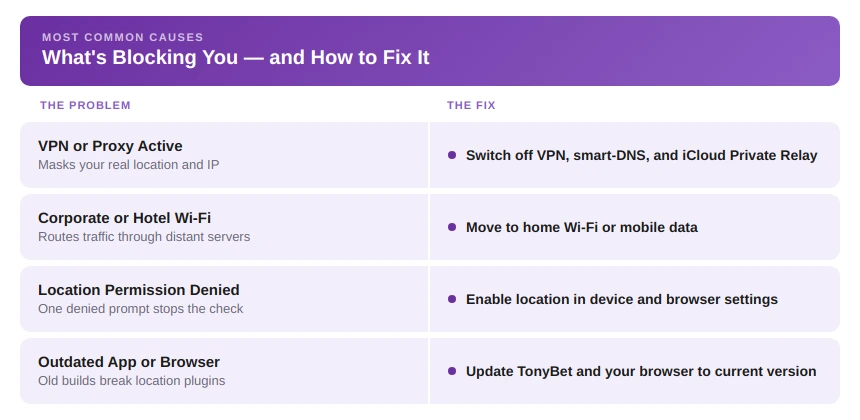
Most blocks trace back to four causes.
VPNs and Proxy Services
A VPN or proxy hides your real location, so the check fails by design. TonyBet’s terms prohibit masking your IP or using a VPN, and the provider flags data-centre and VPN ranges through blacklisting. Switch these off before you play.
Wi-Fi and Network Configuration Issues
Corporate, campus, and hotel networks route traffic through distant servers, and phone tethering hands your laptop the wrong location. A misconfigured router, firewall, or DNS setting also blocks the location infrastructure from reporting in.
Device Permission Settings
If location services are switched off, or the browser or app never got permission, the check has nothing to read. On mobile, casino geolocation checks are especially sensitive to denied prompts — one denied prompt is enough to stop play.
Browser and App Restrictions
An outdated app, a blocked location plugin, ad-blockers, and strict privacy extensions all starve the check of data. Battery-saver mode that throttles background apps is another offender.
How to Fix Geolocation Errors in Ontario
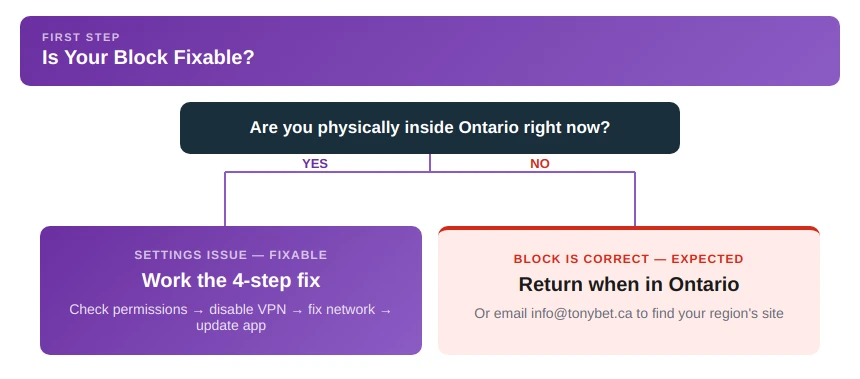
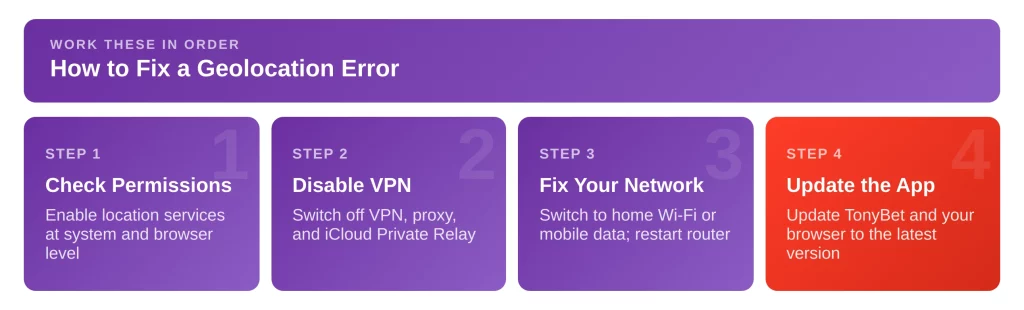
Work these fixes in order; the first three clear most cases.
Checking Location Permissions
Start with permissions.
- To switch on geolocation on iPhone, open Settings, then Privacy and Security, then Location Services, turn it on, and set TonyBet or your browser to “While Using” with Precise Location on.
- On Android: Settings, Location, then the app’s permission.
- On Windows: Settings, Privacy and Security, Location.
Knowing how to turn on geolocation at both the system and browser level helps fix most blocks.
Disabling VPNs and Privacy Tools
Switch off any VPN, proxy, or smart-DNS service, and pause privacy extensions and ad-blockers for the session. On iPhone, also turn off iCloud Private Relay, which masks your IP the same way a VPN does.
Verifying Network and Wi-Fi Settings
Turn Wi-Fi on, even on a wired desktop, since the check uses nearby networks to triangulate. If a corporate or campus network is the problem, move to home Wi-Fi or mobile data, and restart your router to refresh its address.
Updating Browser or App Software
Update the TonyBet app and your browser to the current version, and install or reinstall the location plugin if desktop play prompts for one. An outdated build is a frequent cause of a stubborn geolocation error.
What Players in Other Provinces Should Know
Outside Ontario, a location block is the system working as intended.
Differences Between Ontario and Other Canadian Markets
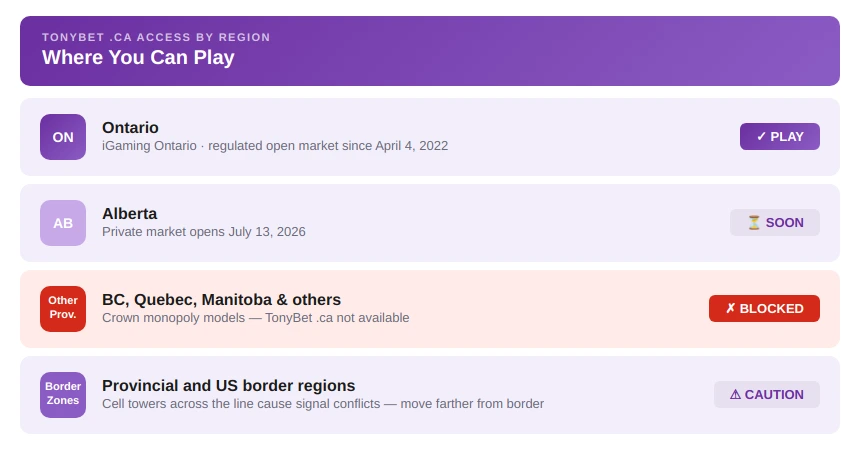
Ontario runs Canada’s only open, multi-operator market, while other provinces offer play through their own lottery and gaming corporations, and Alberta opens its private market on July 13, 2026. TonyBet’s .ca site serves Ontario alone.
Location Verification Outside Ontario
If you travel out of province, TonyBet will correctly block the .ca site until you return. To find out which TonyBet site covers your region, the operator asks you to email info@tonybet.ca or info@tonybet.com rather than route around the check.
Advanced Troubleshooting Steps
If the basics fail, dig a little deeper.
Clearing Cached Location Data
Clear your browser cache and stored site data, which pins an old, wrong location. On Android, clear the app’s cache under Settings, Apps, Storage; on iPhone, reinstall the app, since iOS has no separate cache clear.
Testing With Alternative Networks or Devices
Swap Wi-Fi for mobile data, or vice versa, and try a second device. If one network or phone works and another does not, you have found the source: a router, firewall, or DNS issue.
Contacting Customer Support
TonyBet runs no phone line, so use live chat or email info@tonybet.ca; chat answers in minutes, email in several hours. Give them the exact error, your device and operating system, browser or app version, network type, and whether a VPN was ever on.
How to Avoid Future Geolocation Issues
A few habits keep the checks happy.
Maintaining Accurate Device Settings
Keep geolocation services switched on, keep the TonyBet app updated, and leave VPNs off when you play. Accurate device settings let each geolocation search finish fast and cut repeat failures.
Understanding Travel and Border-Region Challenges
Borderland play is the trickiest. Near a provincial or US border, your phone locks onto a cell tower across the line, the signals disagree, and the check blocks the wager. Move farther away from the border, connect to a stable in-province Wi-Fi anchor, and the location tracking settles. A failed check only blocks that bet; it does not freeze your balance, and enforcement of the perimeter is automatic.
Responsible Gambling
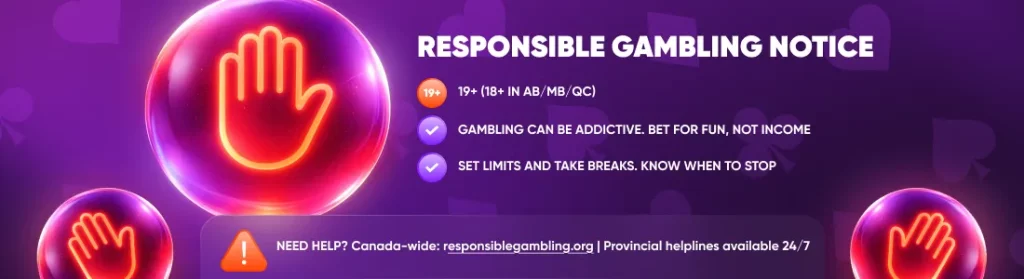
Betting should be entertainment, not a way to make money. Gambling can be addictive—only bet what you can afford to lose, and never chase your losses. Set deposit, loss, and time limits before you play, and take regular breaks.
If gambling stops being fun or starts affecting your finances, relationships, or wellbeing, seek help immediately.
Support available across Canada:
- Responsible Gambling Council: responsiblegambling.org (national resource centre)
- British Columbia: Call 1-888-795-6111 (24/7)
- Alberta: Call 1-866-332-2322 (24/7)
- Quebec: Call 1-800-461-0140 (24/7, bilingual)
- Saskatchewan: Call 1-800-306-6789 (24/7)
- Manitoba: Call 1-800-463-1554 (24/7)
- Atlantic provinces: Call 1-800-461-1234 (NB), 1-888-429-8167 (NS), 1-855-255-4255 (PE), 1-888-899-4357 (NL)
- Additional support: Gambling Therapy (gamblingtherapy.org), Gamblers Anonymous (gamblersanonymous.org)
- 988 Suicide Crisis Helpline: Call or text 988
TonyBet provides responsible gambling tools in your account settings, including deposit limits, loss limits, time limits, cool-off periods, and self-exclusion. Use them.
Age restrictions: You must be 19 or older to gamble in British Columbia, Saskatchewan, and Atlantic provinces. You must be 18 or older in Alberta, Manitoba, and Quebec. Underage gambling is illegal.
For more information about responsible gambling practices and support resources, visit the Responsible Gambling section on TonyBet.
FAQ
Why does the platform think I am outside Ontario?
Can a VPN cause geolocation errors?
Why is location verification failing even when my GPS is enabled?
What should I do if none of the troubleshooting steps work?


